


Using Google Ads and Google Analytics 4 is crucial for your online business’s success. These tools provide essential data on user behavior, marketing effectiveness, user experience, and audience demographics. Google Ads highlights ad performance, top keywords, and campaign comparisons, while GA4 offers deeper insights into user interactions and site journey.
When data from Google Ads and GA4 doesn’t align, it can lead to misunderstandings about campaign performance, ultimately impacting the efficiency and effectiveness of marketing strategies.
Through this article, we’ll use hypothetical examples to illustrate the differences between Google Ads and GA4 in terms of conversion tracking and attribution. By exploring scenarios involving a user named Sarah and her interactions with ads while shopping for sunglasses, we aim to clarify how each platform attributes conversions differently. These examples will help highlight the implications of these discrepancies for marketers seeking to understand and optimize their advertising strategies.
Impact of data discrepancies
Data discrepancies between Google Ads and GA4 can introduce confusion into results reporting. Explaining and understanding these discrepancies can be challenging, necessitating a thorough understanding of different attribution models and tracking methodologies when interpreting results. It is not uncommon for clients to request verification of the setup due to these data differences, which are expected and inherent in the process. Such discrepancies can lead to misinterpretations of campaign performance, obscuring the true effectiveness of marketing efforts. Furthermore, they can erode confidence in the data, complicating the process of drawing reliable conclusions from the insights provided.
Major reasons causing data discrepancies
1) Attribution
Attribution timing
Additionally, consider the difference in how each platform handles attribution timing. Google Ads attributes conversions to the date/time of the click that led to the successful conversion, not the date of the action itself. For instance, if our user Sarah clicks on an ad on May 1st, but completes a transaction 5 days later, Google Ads will record the conversion on May 1st, while GA4 will attribute the conversion to the actual date when the conversion occurred.
Discrepancies in conversion reporting
Google Ads often reports more conversions than GA4 because it attributes a conversion to itself if a Google Ads click occurred at any point within the conversion window*, regardless of the user’s final interaction before the purchase. This means even if a user clicked on a Google ad, but later returned via an organic search or another channel to complete the purchase, Google Ads will still count it as a conversion.
Consider a user named Sarah who sees a Google ad for sunglasses while browsing on her smartphone. She clicks the ad but doesn’t make a purchase. A week later, Sarah returns to the website by searching for the brand on Google (organic search) and then completes the purchase. In this case, Google Ads would still attribute the conversion to the ad she clicked on initially, even though her final interaction that led to the purchase was organic search.
Conversely, relying solely on GA4 data might miss the broader impact of Google Ads campaigns. GA4’s attribution models, which emphasize the user’s last non-direct click, may not fully account for the influence of earlier interactions with Google Ads. As a result, the contributions of ad campaigns to overall conversions might be underrepresented, obscuring their true impact on actual results. While GA4 is now pushing more towards data-driven attribution, which distributes credit across multiple touchpoints based on their impact on the conversion. Even with this shift, GA4 may still report fewer conversions compared to Google Ads, as its model considers a broader range of user interactions, distributing credit more evenly across the entire journey.
Discrepancies in traffic reporting
Google Ads counts each click as a separate event, meaning every time a user clicks on an ad, it is recorded as an individual interaction, regardless of what happens next. In contrast, GA4 tracks sessions, which group user interactions on the site within a specific time frame.
Let’s consider Sarah again. If she clicks on a Google ad for sunglasses twice during the same browsing session — Google Ads will register each click separately, counting it as two distinct interactions. However, GA4 should count this as one session, as long as Sarah remains active on the site without leaving for an extended period. This difference in counting can lead to Google Ads reporting higher traffic numbers, while GA4 emphasizes user behavior during a session, providing a more comprehensive view of site engagement.
Discrepancies amongst different campaign types
Different campaign types are expected to exhibit varying levels of data discrepancies between Google Ads and GA4. For instance, upper to mid-funnel campaigns, which target users who are in the exploration and consideration phase, often show larger differences in data due to the diverse touchpoints and interactions involved. These campaigns might experience more pronounced discrepancies as Google Ads and GA4 apply different attribution models and tracking methodologies.
In contrast, lower-funnel campaigns, such as brand search campaigns, generally show fewer discrepancies. Users who search directly for a brand are more likely to make a purchase soon after interacting with the ad. In this scenario, if the last click on the ad leads directly to a purchase, GA4 will also attribute the conversion to Google Ads. Since both platforms are aligning on the same final interaction, discrepancies between Google Ads and GA4 should be minimal.
2) Data processing delay
When events are collected from your property, GA4 requires some time to process them, with a data processing delay of 24 to 48 hours allowed by Google. This means that, even though your GA4 setup is correct, and events may be collected promptly, it might take up to 48 hours for them to appear in your GA4 reports. In contrast, Google Ads offers near-real-time data updates for active campaigns, allowing advertisers to monitor performance without delay.
3) Conversion counting
Google Ads offers two main conversion counting options: Every conversion and One conversion. Every conversion counts each instance of a conversion action after an ad interaction, making it ideal for tracking multiple sales which resulted from 1 ad click. In contrast, One conversion counts only a single conversion per ad click, focusing on whether a conversion happened rather than the volume of conversions. For example, if you run a law firm you might be more interested in knowing if an ad click results in a new potential client, rather than tracking multiple consultations from the same client, whereas for e-commerce you might be more interested in counting all purchases (even if that includes multiple conversions from one user).
GA4, on the other hand, automatically tracks every event as a conversion by default**, similar to Google Ads’ every conversion counting option. However, GA4 allows for more flexible and customizable tracking of user interactions across sessions, devices, and channels, often providing a broader context for how conversions are attributed. While Google Ads’ options are focused on specific ad-driven actions, GA4’s approach offers a more holistic view of user behavior and conversion paths.
4) Cross-device Tracking
Both Google Ads and GA4 face challenges when it comes to tracking user interactions across multiple devices. If a user engages with ads on different devices—such as a smartphone, tablet, and desktop—it can be difficult to consolidate these actions into a single, cohesive user journey.
For instance, imagine Sarah clicks on a Google Ads display ad for sunglasses on her smartphone but doesn’t make a purchase. Later, she clicks on another Google Ads search ad on her tablet but still doesn’t buy it. Finally, she completes her purchase on her desktop by visiting the website directly.
Google Ads primarily tracks ad interactions and focuses on attributing conversions to Google Ads campaigns. While it can stitch user activity across devices, it typically relies on the user being logged into Google-owned platforms like Gmail, Android, or YouTube and having ad personalization enabled. However, if these conditions aren’t met, cross-device tracking may be less accurate.
GA4, on the other hand, aims to provide a more holistic view by tracking interactions across all traffic sources—not just Google Ads. It leverages tools like user-ID (if implemented) and machine learning-based blended reporting identities to stitch sessions together, even if users aren’t logged in across devices. While this approach can offer a broader perspective, it isn’t immune to challenges, especially when user-ID tracking isn’t set up or consent restrictions limit data collection.
So we come to the question,
What is the right way to look at data from GA4 and Google Ads?

5) Bugs in Google Ads/GA4
Data mismatches can also occur due to occasional bugs in either Google Ads or Google Analytics. For example, the recent GCLID bug in Google Ads, which affected offline conversion tracking in mid-September, caused missing conversion despite successful upload confirmations. While this issue was confined to Google Ads, similar bugs can occasionally occur in GA4, affecting data collection, processing, or reporting. These incidents highlight the importance of staying updated with platform-related news and announcements to quickly identify and address potential issues that may impact your data.
6) Event name length limit reach in GA4
One potential reason for data discrepancies between Google Ads and GA4 is the handling of event name length limits. GA4 enforces a 40-character limit on event names, but only the first 40 characters are used for conversion event matching. A common misconception arises from Google documentation, which implies that when an event is marked as a key event, a “_c” suffix is appended to its name, potentially reducing the usable character limit to 38. In reality, the “_c” is not appended to the event name itself but is instead added as a parameter (“_c=1”) in the network request.
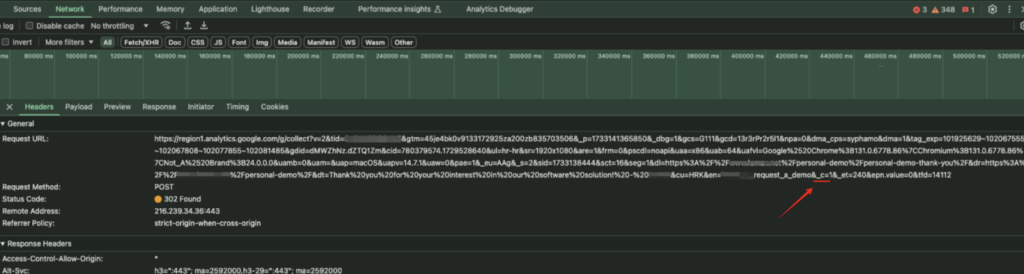
This means users can fully utilize all 40 characters for event names without worrying about leaving space for the “_c” suffix. However, it’s important to note that this occurs client-side, which may further contribute to discrepancies if there are implementation inconsistencies.
So… Can You Finally Tell Me – Which Data is ‘Correct’ Data?
Having explored the discrepancies and their causes between Google Ads and GA4, it’s time to uncover which data should be prioritized for accurate insights.
Let’s illustrate this with another hypothetical scenario: Imagine a brand that is relatively new and primarily relies on Google Ads for initial product exposure. Users might engage with an ad but not make an immediate purchase. Instead, they may revisit the brand through its Instagram or Facebook page, or perform a brand search and click on the organic result over days, weeks, or even months before completing the purchase.
In this situation, GA4 will attribute the conversion to the last touchpoint before the purchase—whether that’s organic social media or organic search. However, even though Google Ads played a key role in the initial product discovery, it’s important to have visibility into all the channels the user engaged with throughout their journey and take a look at which channel ultimately drove the conversion. This information helps marketers better understand the full customer journey and how different channels contribute to the final outcome.
So, the truth is that neither Google Ads nor GA4 provides a completely accurate or definitive picture on its own. Understanding the differences between these platforms and knowing how to leverage each data source effectively is essential. Both platforms offer unique insights that, when combined thoughtfully, deliver a more comprehensive and accurate view of marketing performance. Utilizing the strengths of both Google Ads and GA4 enables a more nuanced analysis and better-informed decision-making.
Conclusion
Tracking data differences between Google Ads and Google Analytics 4 is essential to accurately assess your marketing efforts. Google Ads provides almost immediate data updates and attributes conversions to the date when a user clicked on an ad, while GA4 processes data with a delay and attributes conversions to the actual date of transaction. Beyond this difference, discrepancies are also observed in various aspects such as attribution model differences and event name length limitations. Recognizing these discrepancies helps avoid misinterpretations and ensure better strategic decisions. GA4 might underrepresent certain channel’s impact by focusing on the last non-direct click, while Google Ads might over-report conversions by crediting Google Ads each time for a conversion if a click on an ad occurs throughout the conversion journey. Additionally, differences in traffic reporting and cross-device tracking further complicate the comparison between these 2 tools.
It is important to understand that these differences in data are not uncommon, and, in most cases, can be explained by the reasons discussed in this article. However, large, unexplained differences, such as thousands of conversions recorded in Google Ads, but none in GA4, may indicate technical setup errors or even bugs in the platforms. These situations require a closer investigation to ensure the data integrity and reliability of your insights.
Ultimately, no single source of data is 100% correct. Instead, recognizing the insights provided by both platforms and leveraging them together can offer a more comprehensive view of your marketing performance. By acknowledging the strengths and constraints of each platform, you can make more informed decisions and optimize your marketing strategies for better results.
* Time frame within a conversion was done.
** While this is the default setting, it can be changed in GA4 settings.